Problem 01
Twenty plugins holding the site together
Every update risks breaking something, security patches never end and pages get slower with each new plugin your team adds.

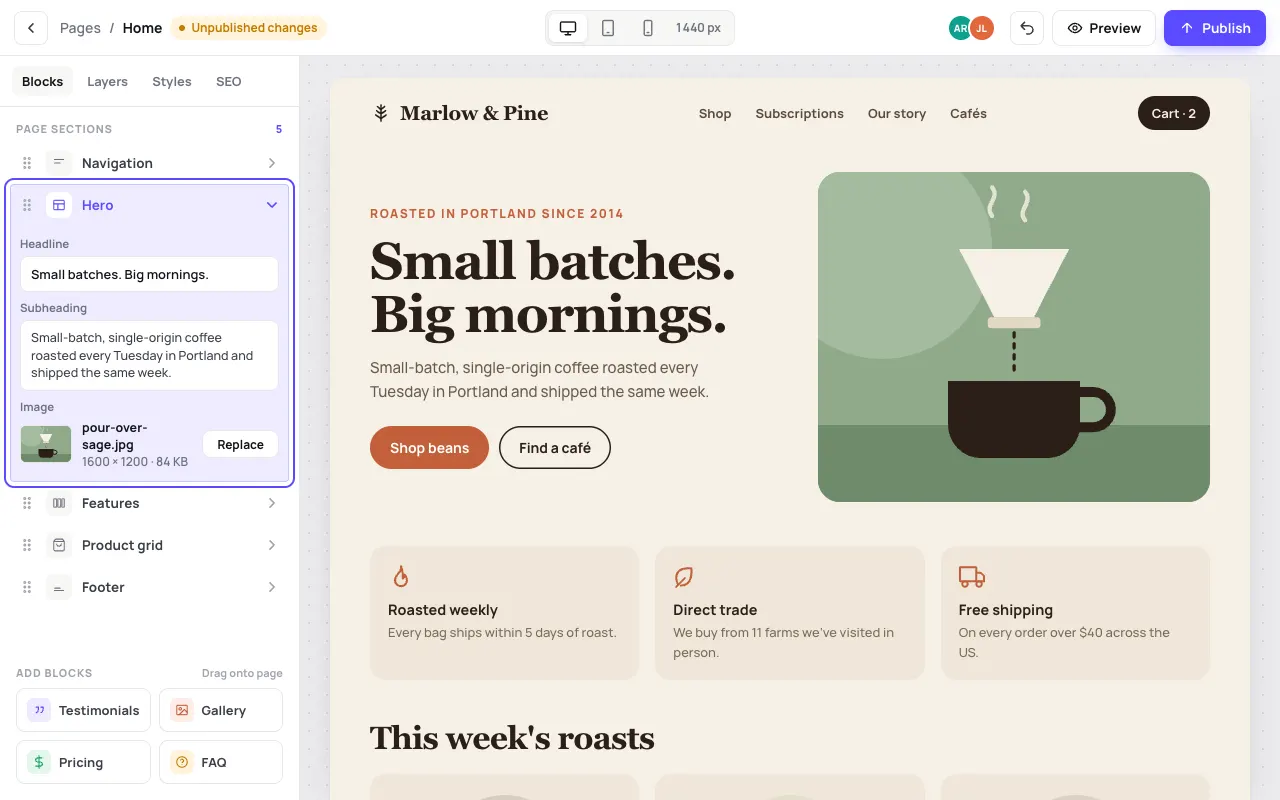
We build custom and headless content management systems for businesses whose content has outgrown WordPress plugins or a page builder. Your team edits pages, listings, menus or articles with live preview and one-click publish, on a fast Next.js front end you own. Most projects launch in 6-12 weeks.
WordPress or Webflow is usually the right choice for a standard marketing site or blog with one or two editors. A custom or headless CMS makes sense when your content is structured data, property listings, products, locations, courses or practitioners, that has to appear across a website, an app and other channels. It is also worth it when plugin conflicts, security updates and slow page builders are costing real time, when you need approval workflows and roles that off-the-shelf tools do not offer, or when you want to stop paying per-seat platform fees. The trade-off is a higher upfront cost, so we recommend it only when the long-term saving or capability is clear.
Every update risks breaking something, security patches never end and pages get slower with each new plugin your team adds.
Page builders are either too rigid or so loose that every page looks different, so small edits end up in a developer's queue.
Listings, menus or articles live in website templates, so you can't reuse them in an app, a portal or an email without re-typing.
Builds the page from your own blocks, with the brand rules built in.
Meta title, description and redirects edited right beside the content.
The editor is notified, reviews and approves; every version is kept.
Preview on desktop and mobile, then pick the publish time.
Website, app and email pull the same content through the API.
Drag-and-drop sections built from your own design system, so editors can create new pages without breaking the brand.
Listings, products, locations, team members or courses modelled as proper data with fields, relations and validation.
See exactly how a change looks on desktop and mobile before it goes live, then publish now or schedule it.
Author, editor and admin roles, approval workflows, full version history and one-click rollback.
Content served through an API to your Next.js website, mobile app or other channels, write once, publish everywhere.
Editable meta titles, descriptions, redirects, schema and sitemaps, on a front end that loads fast without plugin bloat.
Live websites designed and built by Kyoren Worldwide.
US sites face a steady stream of accessibility claims under the ADA, so we build components to WCAG 2.1 AA and give editors guard-rails such as required alt text and heading structure. If you collect data from California residents, CCPA/CPRA notices and opt-outs can be managed in the CMS rather than hard-coded.
UK sites must follow UK GDPR and PECR, which means a consent banner that blocks non-essential cookies until people opt in, and forms that collect only what you need. Accessibility is expected under the Equality Act 2010, and public sector bodies must meet the Public Sector Bodies Accessibility Regulations. We build to WCAG 2.1 AA and can host in the UK or EU.
Australian organisations covered by the Privacy Act 1988 must handle personal information in line with the Australian Privacy Principles, and inaccessible sites can attract complaints under the Disability Discrimination Act 1992. We build to WCAG 2.1 AA and can host content in Australia for speed and data-residency preferences.
We audit your current content, editors and workflows, model your content types and plan the migration. You get a fixed quote.
Your editors click through the editing screens and page blocks before build, so the CMS matches how they actually work.
Working software every 2 weeks: content model and editor first, then front end, integrations and migration scripts.
We migrate content, set up redirects to protect rankings, train your team, then provide hosting, updates and new blocks.
As a typical market guide, a custom CMS with a block editor and a new Next.js front end often lands between $15,000 and $80,000, depending on the number of content types, workflows, integrations and how much content needs migrating. A headless setup on an existing CMS platform can cost less. We give a fixed quote after discovery.
Most projects take 6-12 weeks from scoping to launch, including content migration and training. You see a clickable prototype of the editor early, before development starts.
A headless CMS stores content and delivers it through an API, rather than tying it to one website's templates. You need one if the same content appears in more than one place, a website and an app, several regional sites or a portal. If you only have one marketing site, a simpler setup may be enough, and we will say so.
Yes. We script the migration of pages, posts, media and metadata, map old URLs to new ones with 301 redirects and check that titles and structured data carry over, to protect your search rankings.
That is the point. Editing screens are designed around your team's tasks, with live preview, reusable blocks and guard-rails, and we train your editors before handover.
You do. You own the code, the content and the hosting accounts. There are no per-seat licence fees to us and no lock-in.
A custom CMS has a much smaller attack surface than a plugin-heavy WordPress install. We add role-based access, single sign-on where needed, audit logs, backups and regular dependency updates as part of ongoing support.
Yes. We connect forms and content to CRMs such as HubSpot or GoHighLevel, payment and e-commerce systems, email platforms and analytics, and, as a performance marketing agency, we make sure conversion tracking works from launch.
Book a free 30-minute call. We'll look at what you have today and tell you exactly what we'd do, how long it takes and what it costs.